
MILLBOX
Il software CAM dentale ultra facile e intelligente
- Come posso recuperare le informazioni della mia licenza MillBox?
- Come posso richiedere una licenza temporanea di MillBox?
- Come posso attivare la mia licenza temporanea?
- Quali sono i requisiti tecnici consigliati per il PC?
- Come posso ottenere la formazione per MillBox?
- Come posso ottenere le funzioni più recenti di MillBox?
- Come posso accedere all’assistenza tecnica? Esiste una guida o un video che posso utilizzare per iniziare a usare il software MillBox?
- Aggiornamenti annuali vs Rilascio della versione annuale – qual è la differenza?
- Quali tipologie di elementi posso gestire con MillBox?
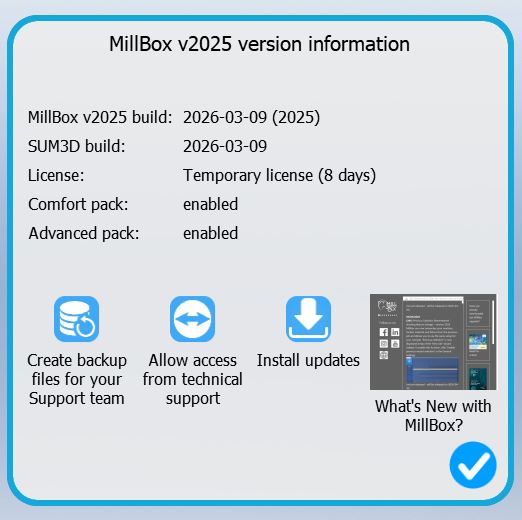
Come posso recuperare le informazioni della mia licenza MillBox?
Per recuperare le informazioni della tua licenza MillBox, devi cliccare su “Seleziona Gestione Progetto” sul lato sinistro della schermata iniziale di MillBox, quindi vai su “Supporto”. Una volta cliccato su “Supporto”, si aprirà una finestra della pagina di supporto, che mostrerà le seguenti informazioni:
Come posso richiedere una licenza temporanea di MillBox?
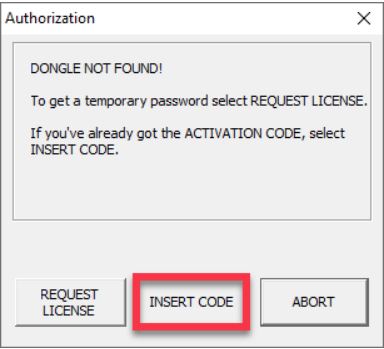
Come primo passo, devi assicurarti che MillBox sia installato. Per assistenza nell’installazione, contatta il tuo rivenditore o distributore. Se MillBox viene avviato senza un dongle, una finestra di notifica indicherà che non è stata trovata alcuna chiave. Clicca su RICHIEDI LICENZA. Verranno visualizzati il tuo Codice di Installazione a 20 cifre e la Richiesta della Chiave Temporanea.
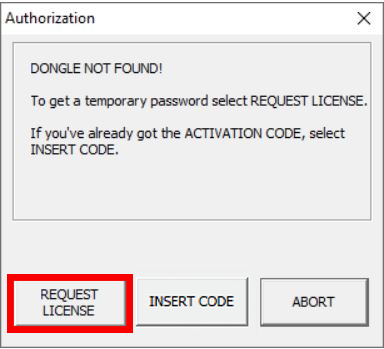
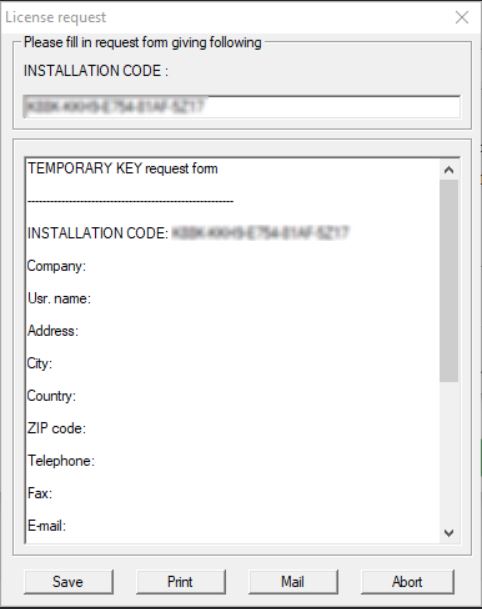
Copia il Codice di Installazione a 20 cifre e includilo in un’email insieme ai seguenti dettagli:
- Oggetto: Licenza Chiave Temporanea
- Nome del Rivenditore:
- Nome del Laboratorio:
- Informazioni di Contatto (ID Skype, Numero di Telefono, Email, Ecc.):
- Motivo della richiesta del codice temporaneo:
Inviare a:
- Americhe: support.americas@cimsystem.com
- Asia: support.asean@cimsystem.com
- Internazionale: support@cimsystem.com
Attendi una risposta entro 12-24 ore lavorative con la tua Chiave di Licenza Temporanea.
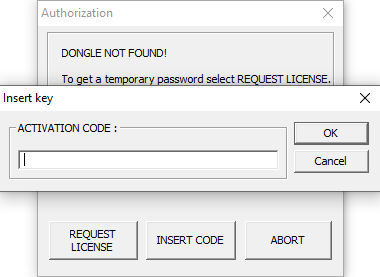
Inserisci il codice a 18 cifre ricevuto da CIMsystem nel campo Codice di Attivazione. Ti verrà quindi richiesto di riavviare MillBox.
Quali sono i requisiti tecnici consigliati per il PC?
Puoi leggere i nostri requisiti tecnici consigliati cliccando qui.
Come posso ottenere la formazione per MillBox?
Per ottenere formazione sul software MillBox, contatta il tuo rivenditore oppure contatta CIMsystem compilando questo form. Non offriamo corsi di formazione di gruppo, ad eccezione degli Stati Uniti.
Come posso ottenere le funzioni più recenti di MillBox?
Per ottenere i miglioramenti software più recenti, come nuove strategie, nuovi utensili e pacchetti di materiali o nuove funzioni, è necessario aggiornare MillBox all’ultima versione disponibile. Se desideri effettuare l’aggiornamento, contatta il tuo rivenditore o un rappresentante commerciale di CIMsystem.
Come posso accedere all’assistenza tecnica? Esiste una guida o un video che posso utilizzare per iniziare a usare il software MillBox?
Esistono diverse opzioni per ottenere un rapido supporto su MillBox:
- Puoi accedere alla playlist di video HOW TO su You Tube
- Puoi unirti e interagire con il gruppo Facebook “MillBox Expert”, la community in cui condividere problemi e soluzioni. Unisciti al gruppo ora!
- Accedi al nostro MillBox Learning Center https://help.cimsystem.com/ , il tuo unico punto di riferimento per guide ufficiali MillBox e tutorial passo-passo!
Aggiornamenti annuali vs Rilascio della versione annuale – qual è la differenza?
Forniamo aggiornamenti frequenti durante l’anno e non tratteniamo le funzionalità migliori per un rilascio annuale. Acquistando la Licenza Annuale, si ottiene l’accesso a tutti i miglioramenti e sviluppi del software che avvengono dal 1° gennaio al 31 dicembre. Questi aggiornamenti includono:
- Nuove funzionalità e miglioramenti delle prestazioni
- Miglioramenti generali della strategia CAM
- Correzioni di stabilità e aggiornamenti di compatibilità (ad esempio per Windows)
È importante acquistare gli Aggiornamenti Annuali non appena disponibili, per sbloccare tutti i vantaggi fin dal primo giorno.
Quali tipologie di elementi posso gestire con MillBox?
Con il CAM Dentale MillBox puoi gestire sia manufatti semplici che complessi, su qualsiasi tipo di materiale e con macchine aperte. Il software include tutto ciò di cui hai bisogno, in un formato plug and play, per creare qualsiasi manufatto dentale: dai più semplici, come corone e ponti, fino ai casi più impegnativi, come barre e sovrastrutture. E se ti serve di più, puoi anche accedere al nostro strumento di gestione delle strategie per lavorare sulle strategie di fresatura dentale. Non ci sono limiti alle prestazioni di MillBox, se non le tue esigenze produttive.
Potresti essere interessato anche a: