
MILLBOX
Dental CAM software for smart restorations
MillBox capabilities can be enhanced with the purchase of some additional applications that can be integrated within your current version of the software.

MillBox Automate is a MillBox add-on that allows you to automate your CAM nesting workflow!
How does it work? Simply drop your .STL files into a folder with user-defined rules and MillBox Automate will automatically perform key workflow steps including:
- Machine, Toolset, and Material selection
- Object type assignment
- Part placement in the material
- Pin/sprue placement
- .STL curves/surface detection (margin line, insertion direction, screw-channel/drilling operations, etc.).
After nesting is complete, users can either review the job and make final nesting adjustments before calculating or the workflow can be setup to automatically calculate and output the CNC file. MillBox Automate is designed to help labs reduce time spent on repetitive CAM steps, while maintaining full control over the final machining setup.

Available as a MillBox integration, Make&Mill allows the user, within one application, two technologies: the additive and subtractive technique. Creating the object with additive technology, sintered metal or resin, the Make&Mill dental CAM allows the user to take up work again to the milling object. The benefit is double: the additive technology ensures lower cost and commitment of the operators, while the subtractive technology brings precision finishing to the surfaces of the restorations.
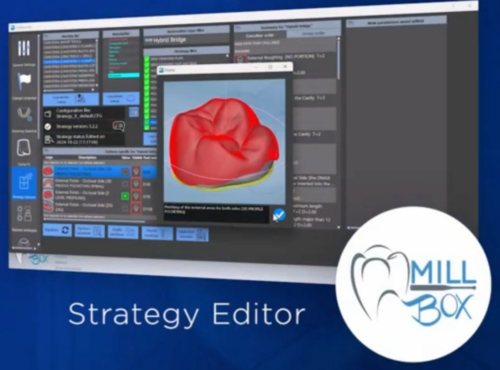
The new configurator represents an unprecedented leap in strategy management. It allows you to select and duplicate predefined strategies as a basic user while giving you the possibility of accessing and creating fully customized strategies as an expert, all according to your specific needs. Either way, the strategy will automatically grow and be updated with the new features through software updates, freeing you from the need to edit, test and fine-tune your strategy to keep it up-to-date. MillBox saves your time and resources and keeps you at the forefront of innovation.
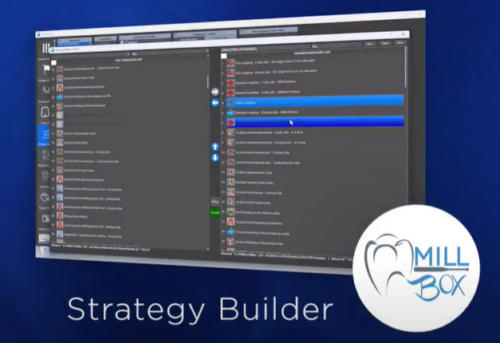
Strategy Builder is a new powerful tool that comes within Strategy Editor and allows users to reorganize their own strategy according to their prefereneces, as well as simplifying the strategy visualization by omitting usless operations from the view. The Strategy Builder is a real revolution in the way dental milling strategies are built and managed, providing operators with unprecedented level of flexibility and reliability. Indeed, the tool is also able to prevent mistakes in case of wrong operations reorganization.
You may be interested also in: